3D/2D Maze Generator (Blender/Python Script) for 3D Printers and Laser Cutters
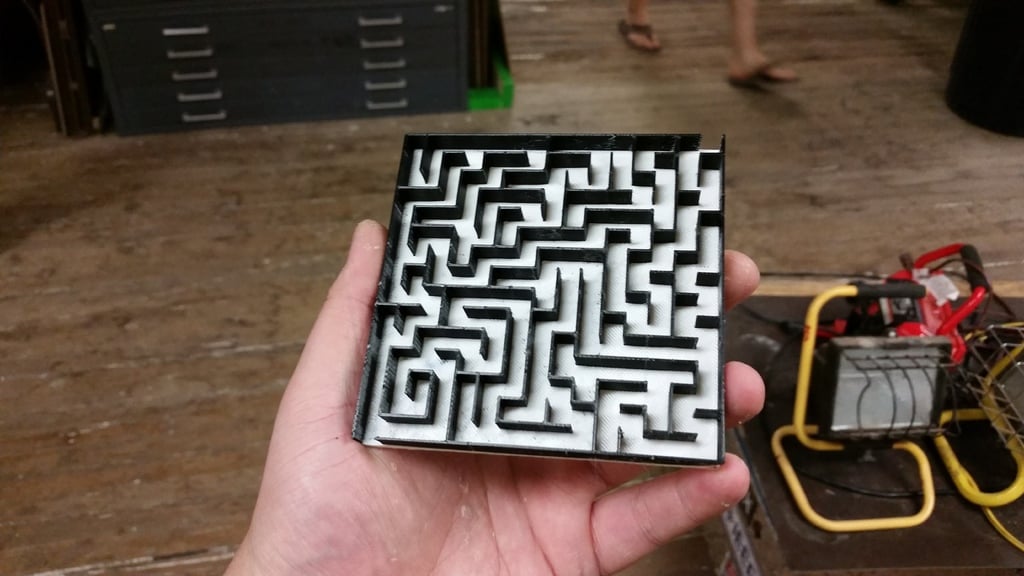
EDIT 1 (3/24/15): Added dual extrusion support.
EDIT 2 (3/24/2015): Added option to have entrance and exits closed, also added setting to make 2D vector path instead of 3D mesh. Fixed minor redundancy in code.
EDIT 3 (3/25/15): Fixed minor settings conflict, added more comments for clarity.
So I've had a thing for maze generation for a while. While I wrote a few different games in HTML 5/Javascript and C, I wanted to make something that was actually physically real.
A search on Thingiverse led me to a Python script that generated an OpenSCAD description of a maze, but that seemed too round-about for me. Besides, I like the looks of the classic recursive-backtracker algorithm more than any other, and it's so deliciously simple to implement. Also, I really, really like generating mazes. :) So, I decided to write my own.
Initially, I wanted to implement it in OpenSCAD, but because it uses a functional language, determined that it was impossible. (Apparently I was totally wrong!) However, I finally got it working as a Python script within Blender.
This took about a year or so of very sparse tinkering. Initially, I was trying to use booleans to add and subtract cuboids (like OpenSCAD), but that proved problematic due to the finicky nature of normals and stuff. So, I wound up making the maze as a 2D mesh (vertex by vertex, face by face), then extruding it and adding the base later.
This is fully functional, but there are a few features I still want. I really want to be able to mark the start and end, but I'm not sure how I should do it. Leave a comment and give me your ideas!
P.S.
For fun, the 20x20_humanSize.stl is a 20 X 20 maze that would be suitable for a human to walk around in. (62600 mm x 626000 mm total, or about 98.6 acres). Here are the settings: (thanks, Google!)
width = 20 #how many cells widelength = 20 #how many cells longcellThickness = 2500 #width of passages [mm]wallThickness = 600 #width of walls [mm]wallHeight = 2500 #height of walls [mm]baseHeight = 300 #height of base [mm]
Good luck printing that at 1:1 scale.